This guide explains the Kitchenaid Washer Ld Error: what it means, what causes it, and how to resolve it safely.
Understanding the Kitchenaid Washer Ld Error
Below, our specialists break down everything you need to know about the Kitchenaid Washer Ld Error.
Understanding the Kitchenaid Ld Error
Below, our specialists break down everything you need to know about the Kitchenaid Ld Error.
What Ld means on your KitchenAid washer
Ld appears on top-load KitchenAid washers when either the drain phase takes longer than the machine allows or the motor senses it’s working harder than it should to move the drum. Rather than continue pushing through what could be a mechanical strain, the washer’s protective logic shuts the cycle down and shows this code. A KitchenAid Ld error is closely tied to two very different situations — one being a blocked drain path, the other being an overloaded or unbalanced laundry load — so figuring out which one applies is the first step in resolving it.
Because Ld shares its drainage half with the F21 code, many of the same causes apply: kinked hoses, clogged filters, and blocked pumps. But Ld can also show up purely from a mechanical standpoint, such as a heavy blanket tangled around the agitator or a slipping drive belt that can’t transmit enough torque to the drum. Sorting out whether the problem is water-related or load-related usually points you toward the right fix.
Symptoms
- The washer halts mid-cycle with Ld showing on the display
- The drum may feel unusually heavy or off-balance when you open the lid
- Water may or may not still be present in the tub, depending on the trigger
- You might hear the motor straining or humming without much movement before the shutdown
- The problem often recurs with certain heavy or bulky items like comforters
Common causes
- A restricted drain path, similar to F21, caused by a blocked hose, clogged filter, or kinked connection preventing water from clearing in time
- An unbalanced or tangled laundry load, especially heavy items like blankets or bedding wrapped around the agitator, which trips the motor’s overload protection
- A loose or worn drive belt on belt-driven models that can no longer transfer enough torque to the drum, mimicking an overload condition
Troubleshooting steps you can try
- Unplug the washer before reaching into the drum or opening any access panels, and shut off the water supply if you need to inspect hoses.
- Open the lid and check whether the laundry has bunched up on one side or tangled around the agitator. Redistribute items more evenly and break apart anything wound tightly.
- Restart the cycle after redistributing the load and see if Ld clears — this alone resolves a large share of cases involving heavy or bulky items.
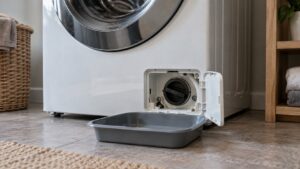
- If redistributing the load doesn’t help, check the drain pump filter and hose using the same process used for F21: clear debris from the filter housing and confirm the hose isn’t kinked or inserted too deep into the standpipe.
- Split oversized loads like comforters or mattress pads into smaller batches going forward to prevent the overload condition from recurring.
When to call a technician
Bring in a specialist for your washer if any of the following apply:
If the washer keeps reporting Ld, it is time for an experienced technician. Schedule your repair online, check other error codes, or find specs at kitchenaid.com.