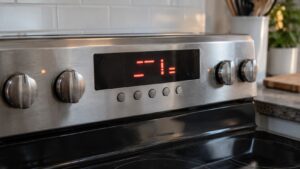
This guide explains the Kitchenaid Range F1 E1 Error: what it means, what causes it, and how to resolve it safely.
Understanding the Kitchenaid Range F1 E1 Error
Below, our specialists break down everything you need to know about the Kitchenaid Range F1 E1 Error.
Understanding the Kitchenaid F1 E1 Error
Below, our specialists break down everything you need to know about the Kitchenaid F1 E1 Error.
What F1 E1 means on your KitchenAid Range
The F1 E1 display on a KitchenAid range shows up the moment the electronics decide the control board reports that the keypad touch-calibration values stored in EEPROM are missing or unreadable. The touchpad may respond erratically or not at all, and the oven locks out cooking functions until calibration data is restored. The condensed description used by service techs is keypad calibration data lost.
Rather than treating the KitchenAid F1 E1 error as a mystery, think of it as a diagnostic shortcut: the board has already isolated the problem to one circuit or mechanism, which narrows what our independent technicians need to inspect. A breaker reset resolves calibration-loss problems caused by a power interruption. If the EEPROM sector has physically failed, the code will return on the next startup and a board replacement will be necessary.
On KitchenAid ranges, this problem is diagnosed the same way whether the unit is a few months old or well past its first decade of service — the electrical or mechanical signature of F1 E1 doesn’t change with age, only the likelihood of which specific cause applies.
Symptoms
- The control panel displays the F1 E1 error code and refuses to clear with normal button presses.
- Power-cycling the range may clear the display temporarily, but the underlying condition can return.
- Related symptoms can include the specific issue described by “EEPROM sector storing keypad calibration has failed” — the specific memory sector allocated to touch-calibration data has exceeded its write life and returns read errors on every startup.
- Cooking or heating functions tied to this problem (keypad calibration data lost) are locked out until the code is resolved.
- In some cases you’ll also notice signs pointing toward “defective or delaminated touchpad membrane”.
Common causes
Here’s what tends to be behind F1 E1 on this appliance family:
- EEPROM sector storing keypad calibration has failed. The specific memory sector allocated to touch-calibration data has exceeded its write life and returns read errors on every startup. This typically requires a technician to resolve.
- Power interruption during a calibration write cycle. A brief outage while the board was writing new calibration data left that sector partially written and unverifiable. This is sometimes something you can check yourself first.
- Defective or delaminated touchpad membrane. Physical damage or moisture intrusion behind the touchpad glass causes capacitance readings that cannot be calibrated to usable thresholds. This typically requires a technician to resolve.
Troubleshooting steps you can try
Work through these checks in order — each is safe for a homeowner and helps narrow down what is causing the problem on your KitchenAid range before you call anyone.
- Breaker reset to clear transient calibration loss. Turn the range breaker off for five minutes, restore power, and test each keypad zone by pressing every pad once to check for consistent response. If all pads respond correctly after the reset, the calibration data was corrupted by the power loss rather than by chip failure.
- Check for moisture or debris under the control panel. Inspect the area around the touchpad for signs of steam or grease intrusion that could alter capacitance readings. Clean gently with a dry cloth. Never use liquid cleaners directly on the touchpad face — moisture reaching the membrane layer is a leading cause of persistent calibration errors.
When to call a technician
Hand the range over to a qualified technician in these situations:
- Problem persists across three or more breaker resets
- Touchpad shows physical damage, bubbling, or discoloration
- F1 E1 appears alongside other F1-series codes
When the F1 E1 error persists after these steps, an experienced technician should take over. You can schedule service in minutes, review other range error codes, or check specs at kitchenaid.com.